A construction budget defines how much a project is approved to spend and how those funds are organized. It converts scope into clear categories that link to contracts, cost codes, and reporting.
This guide explains how to build a practical construction project budget and manage it throughout delivery. It focuses on setup, tracking, and forecast updates that keep spending aligned with approved limits.
What is a Construction Project Budget?
A construction project budget is the total estimated cost of completing a project, covering materials, labor, equipment, permits, and unforeseen expenses. It serves as a financial plan that keeps the project on track and prevents overspending.
To create an accurate budget, project managers assess blueprints, material requirements, labor costs, and site preparation needs. Every project, whether residential or commercial, must have a well-structured budget to manage construction costs effectively and avoid delays.
During project delivery, the budget moves into active control. Project managers compare approved amounts with commitments and invoices. They adjust forecasts to reflect current exposure in line with broader construction budgeting practices across the project lifecycle.

What is Included in the Budget?
A construction budget includes all costs required to complete a project. Direct costs relate to physical construction work. Indirect costs support delivery but are not tied to measurable trade output. Financing and contingency cover funding expenses and risk reserves.
Below is a practical breakdown of common cost items within those categories:
For example, in large-scale commercial projects, indirect costs like permits, insurance, and administrative fees can be as significant as direct construction costs. On the other hand, residential projects may allocate a larger portion to materials and labor.
What a Construction Project Budget Looks Like
In practice, a construction project budget operates as a live cost register within a controlled system. It reflects approved funding, tracks adjustments, and shows how allocations are distributed across packages. Once established, it becomes the reference point for monitoring financial movement.
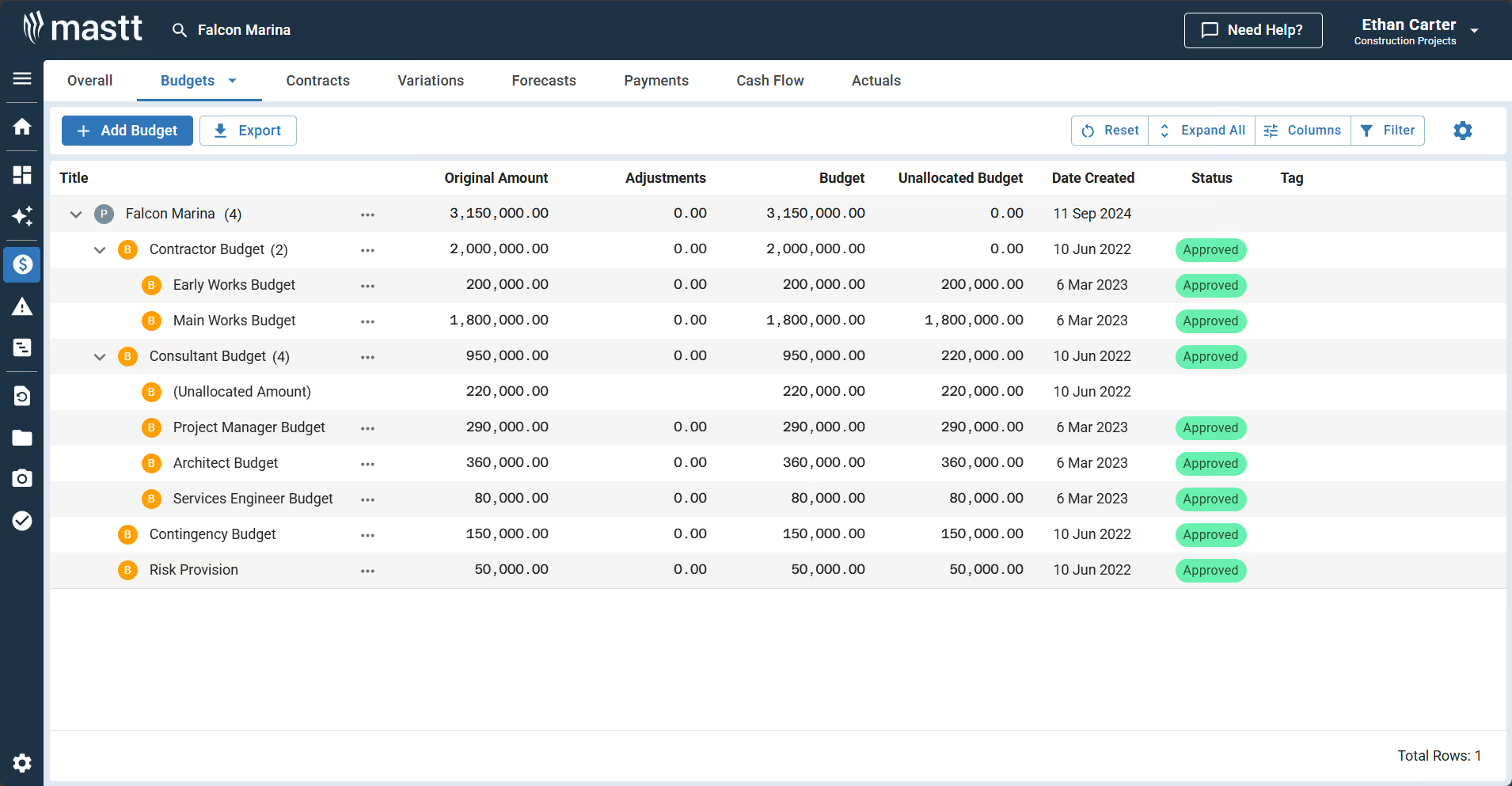
The example above shows how budgets are organized in Mastt. Parent budgets group major cost areas, with sub-budgets nested beneath them. Each line shows the original amount, adjustments, current budget, and remaining balance. This layout keeps the budget clear and controlled before commitments are made.
How to Create a Construction Project Budget
To create a project budget, define the full scope, price each cost category, set a baseline, and track performance against it.
The steps below outline how to set up the cost framework and manage it from planning through delivery.
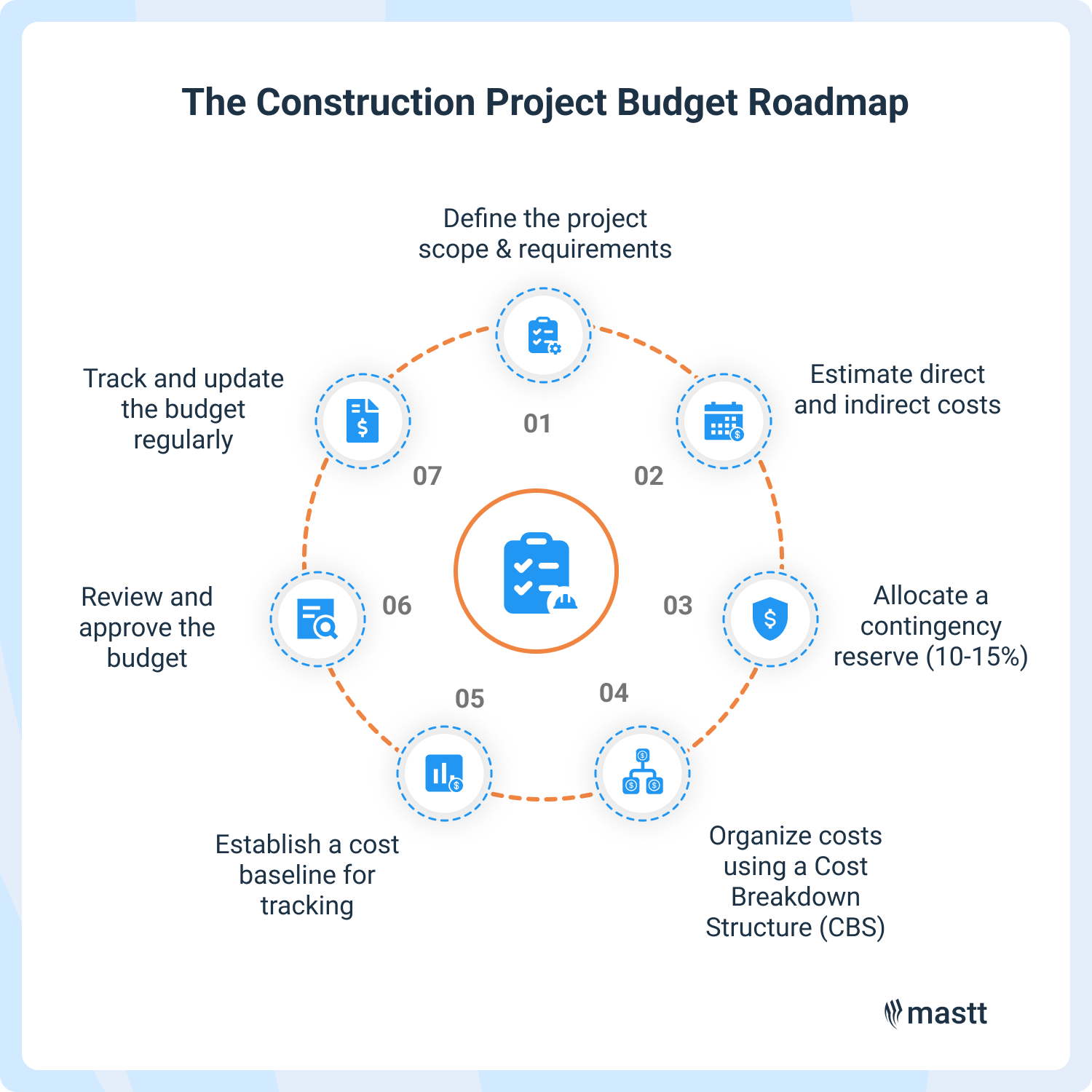
Step 1: Define the project scope & requirements
Start with complete and coordinated project documentation. A clear project scope reduces pricing gaps and limits cost growth later.
- Work Breakdown Structure (WBS): Divides the project into measurable tasks to support cost planning and tracking.
- Scope of Work (SOW): Lists deliverables, materials, timelines, and performance expectations.
- Statement of Work: Defines contractual terms, responsibilities, and financial obligations.
Step 2: Estimate direct and indirect costs
Price all construction budget categories, including labor, materials, equipment, permits, professional fees, and site overhead. Use current market rates and confirmed quantities wherever possible. Reliable inputs improve project budgeting accuracy.
💡Pro tip: Use our free construction cost calculator to quickly estimate project costs and improve budget accuracy.
Step 3: Allocate a contingency reserve (10-15%)
Set aside contingency based on identified project risks. Most project owners and cost managers allocate 10 to 15 percent of total cost as contingency, adjusting it based on design maturity and market conditions. Define clear approval rules so contingency is released only against documented risks.
Step 4: Organize costs using a Cost Breakdown Structure (CBS)
Create a Cost Breakdown Structure (CBS) that aligns with procurement packages and reporting needs. Assign each cost to a consistent code. Clear categorization keeps the budget organized and ensures all costs are accounted for.
Step 5: Establish a cost baseline for tracking
A cost baseline is a financial plan that makes construction cost tracking easier and prevents the project from exceeding its planned budget. Once reviewed and approved, lock the budget as the cost baseline. This becomes the reference for tracking commitments and actual spending.
Step 6: Review and approve the budget
Before approval, test the construction budget against procurement strategy and delivery risk. Confirm contract values and review key assumptions. Approval should formally lock funding limits and define who can authorize budget changes.
Step 7: Track and update the budget regularly
Once work begins, track signed contracts and approved changes before focusing on invoices. Reconcile commitments against each budget category and update the forecast on a fixed reporting cadence. Forecasts should reflect live contract data so the projected final cost stays aligned with real exposure.
💡Pro Tip: Build your forecast from committed costs first, then assess remaining exposure by trade. Use construction budget tracking software that connects cost codes, contracts, and change approvals in one system, so each update pulls from verified data and reduces manual adjustment risk.

How to Manage a Budget for Construction Projects
Managing a construction budget means controlling cost from initial setup through final account. It starts with a project baseline and continues through procurement, delivery, forecasting, and closeout. The objective is to keep funding aligned with commitments and expected final cost.
1. Establish the approved baseline
Lock the cost baseline before major contracts are executed. Confirm funding limits, cost codes, contingency allocation, and approval authority. Record key assumptions so future changes can be assessed against a clear reference.
2. Align the budget with procurement
Record signed contracts against the correct cost codes as soon as they are executed. Capture exposure before invoices are paid. This keeps committed cost visible across all trade packages.
3. Reconcile actual costs
Match invoices to approved contracts and verify remaining balances. Review commitments and payments on a fixed reporting cycle. Reliable reconciliation protects the integrity of the construction budget.
4. Maintain a live forecast
Build the projected final cost from executed contracts and approved change orders. Review remaining scope and adjust for current site conditions. Forecasts should reflect real commitments, not outdated assumptions.
5. Enforce change and contingency control
Approve scope changes only after pricing and funding are confirmed. Update the budget and forecast immediately after authorization. Track contingency usage separately and release it against defined risks.
6. Report and close out properly
Provide regular cost reports that show approved budget, commitments, actual costs, forecasted final cost, and remaining contingency. Investigate material variances early and document funding decisions. At closeout, reconcile final accounts and capture lessons for future projects.
Effective cost management depends on timely updates and clear authority. Small gaps are easier to correct when cost data is current and visible.
Common Execution Mistakes in Construction Budget Management
Common budgeting failures include inconsistent change approvals, outdated forecasts, and misaligned cost codes. These issues reduce transparency and weaken confidence in the construction budget. If left uncorrected, small control gaps grow into material financial risk.
These issues may appear minor at first. When left unresolved, they compound and distort forecast accuracy. Stable construction budget management depends on consistent processes that prevent small discrepancies from escalating.
Who Creates and Manages a Construction Budget?
The construction budget is typically prepared and managed by the project manager. On owner-led projects, the owner approves the final numbers before work begins. Once construction starts, the project manager becomes responsible for keeping the budget accurate and up to date.
Multiple roles contribute information that shapes the final construction budget:
- Project Owners and Developers: Confirm available funding and approve the total project budget before contracts are executed. They review significant cost changes during delivery.
- Project Managers: Build the working budget structure, load contract values, and track spending throughout the project. They update forecasts as procurement and site conditions evolve.
- Cost Estimators and Quantity Surveyors: Provide detailed pricing based on drawings, quantities, and market rates. They assess the cost impact of design changes and change requests.
- Architectural and Engineering Teams: Issue plans and technical specifications that determine material quantities and system requirements. Design decisions directly influence cost exposure.
- General Contractors and Subcontractors: Submit pricing for trade packages and manage labor and material costs within their contracts. They notify the team of potential change orders or scope adjustments.
- Finance and Procurement Teams: Track invoices, manage payments, and maintain financial records. They ensure spending matches contract terms and approved values.
A construction budget remains accurate only when responsibilities are clear. Without proper coordination, reporting quickly falls behind site conditions.
Tools That Support Construction Project Budget Management
Managing a budget requires more than spreadsheets. Accurate tracking depends on tools that connect estimates, contracts, commitments, change orders, and forecasts in one controlled system.
The following tools help teams plan, track, and manage project costs more effectively:
- Cost Estimating Software: Builds quantity-based estimates using current market rates. Improves pricing accuracy before baseline approval.
- Cost Coding and WBS Systems: Organize scope into consistent cost codes aligned with procurement and reporting. Strengthen visibility across budget categories.
- Procurement and Contract Management Software: Track awarded contracts, approved changes, and remaining balances. Keep committed exposure visible against cost codes.
- Change Management Workflows: Control how scope changes are priced and approved. Ensure budget and forecast updates occur immediately after authorization.
- Construction Forecasting Software: Calculate projected final cost from live commitments and actuals. Present approved budget, commitments, actuals, forecast, and contingency in one view.
💡Pro Tip: Lock your cost coding structure before procurement begins and prohibit mid-project recoding. Changing cost codes after contracts are executed distorts historical data and weakens forecast reliability. Stable coding preserves reporting integrity from baseline through closeout.
Take Control of Your Construction Budget with Mastt
Managing a construction project budget requires consistent structure and reliable data. When cost information stays connected to live contracts and approved scope, financial exposure becomes visible before it escalates. Mastt supports disciplined construction budget management by centralizing tracking, cost reporting, and forecast updates within a controlled system.
.avif)
Written by
Doug Vincent
Doug Vincent is the co-founder and CEO of Mastt.com, leading the charge to revolutionize the construction industry with cutting-edge project management solutions. With over a decade of experience managing billions in construction projects, Doug has seen the transformative power of the industry in building a better future. A former program manager, he’s passionate about empowering construction professionals by replacing outdated processes with innovative, AI-driven tools. Under his leadership, Mastt serves global clients, including governments, Fortune 500 companies, and consultants, delivering solutions that save time, enhance visibility, and drive efficiency. Doug also mentors entrepreneurs and shares insights on LinkedIn and YouTube.


Contributions by
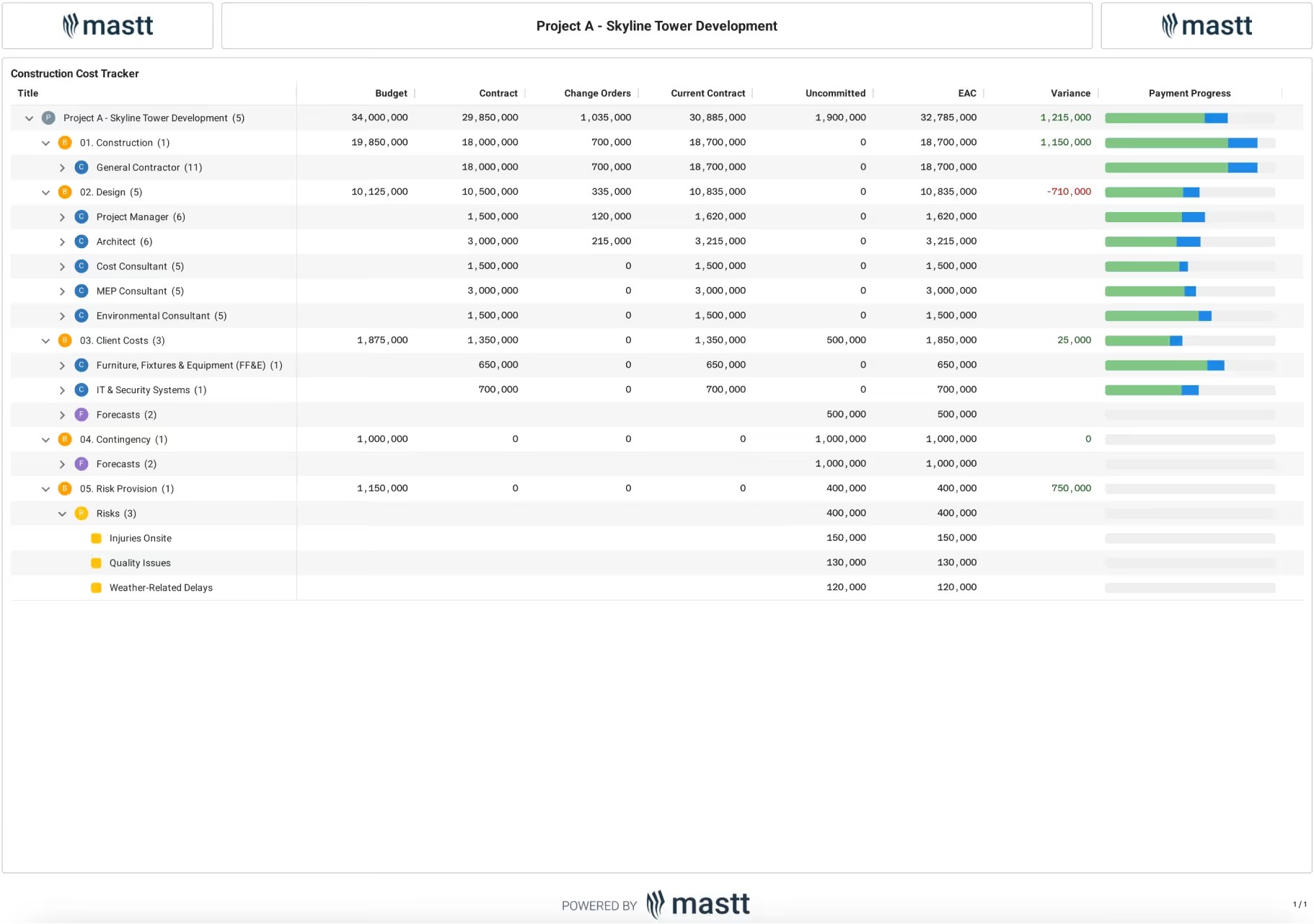
Project Budget Template
Use this FREE Project Budget Template to monitor and manage the financial performance of your capital project or program. Track costs with clarity and control.

Walk Into Every Meeting With Confidence, Clarity, and Control
No one wants to look unprepared, blindsided, or uncertain in front of stakeholders — but that’s exactly what happens without Mastt.
Start for FreeTrusted by the bold, the brave, and the brilliant across governments, Fortune 500s, and the world’s best in delivering the future